

Block Diagram
This document provides a concise block diagram illustrating the architecture of OsmoX. The diagram outlines the key components and their interactions.Overview
The block diagram represents the software application’s architecture in a visual format, making it easier to grasp its structure and functionality.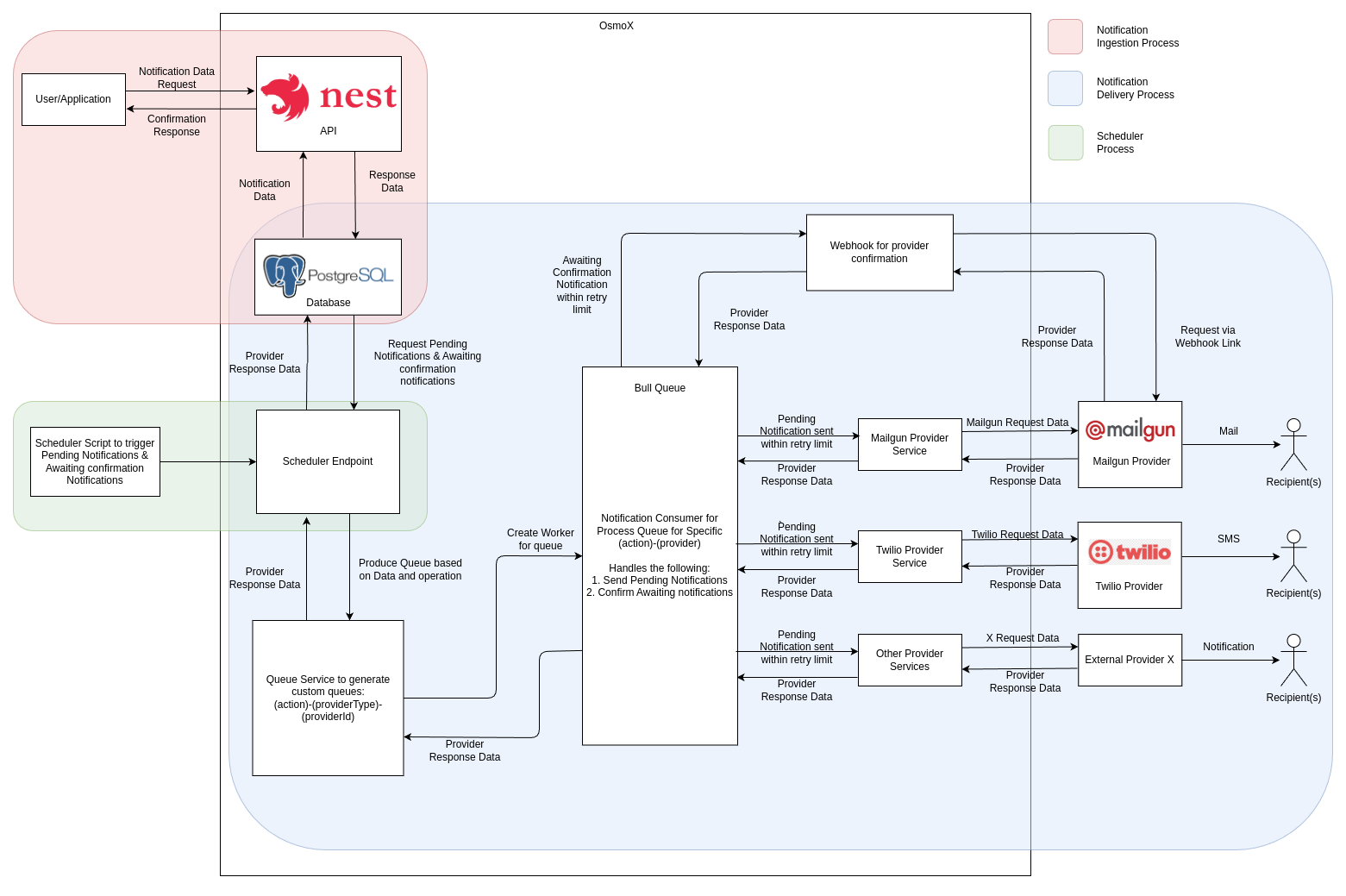
Components and Functionalities
1. User/Application
This component is responsible for making the request to the OsmoX API with required details about the notification.2. API
The core component of project created with NestJS, this is responsible for accepting the incoming requests made by the user/application for creating a notification. A response is sent back to the user/application to signify if the notification was created successfully or if any errors were encountered. Upon receiving the request, the API stores the received details in the database.3. Database
The PostgreSQL database is responsible for holding the records of different notifications that have been created along with all other required details about them such as:- Request body
- Delivery status
- Notification channel type
- Response data
4. Cron
A scheduled cron fetches all the notifications in the pending status from the database and adds their IDs to their corresponding queues for processing.5. Queues
For each supported notification channel type, a separate queue is maintained to allow parallel processing of notifications of different channels. These queues are implemented using Bull Queue (which itself uses Redis). The queue receives the ID of the notification to be sent and fetches details about it from the database using this ID to pass it onto the corresponding service.6. Services
Notifications are processed one-by-one from the different queues and details are passed on to their respective services for performing the required actions for sending the notification. The services hold the business logic for sending the notification. Upon sending the notification, the response is sent back to update the notification details in the database.Data Flow
1
Client Request
Client creates notification via REST/GraphQL API
2
Database Storage
Notification saved to PostgreSQL with
Pending status3
Queue Processing
Scheduler enqueues pending notifications to Bull queues
4
Parallel Processing
Queue consumers process notifications by channel type in parallel
5
Provider Delivery
Provider-specific services send notifications
6
Status Update
Notification status updated based on provider response
7
Archival
Completed notifications archived to
notify_archived_notifications table